By Nick Irmo

WordPress is the best fit if you want full ownership, the most features and room to grow, and you are willing to handle (or pay for) hosting and upkeep. Squarespace is the best fit if you want a polished, design-led site with very little to maintain. Wix is the best fit if you want the most drag-and-drop freedom and a big app market without touching code. All three can run a solid small business site. The real differences are who owns the files, who does the maintenance, and how hard it is to leave.
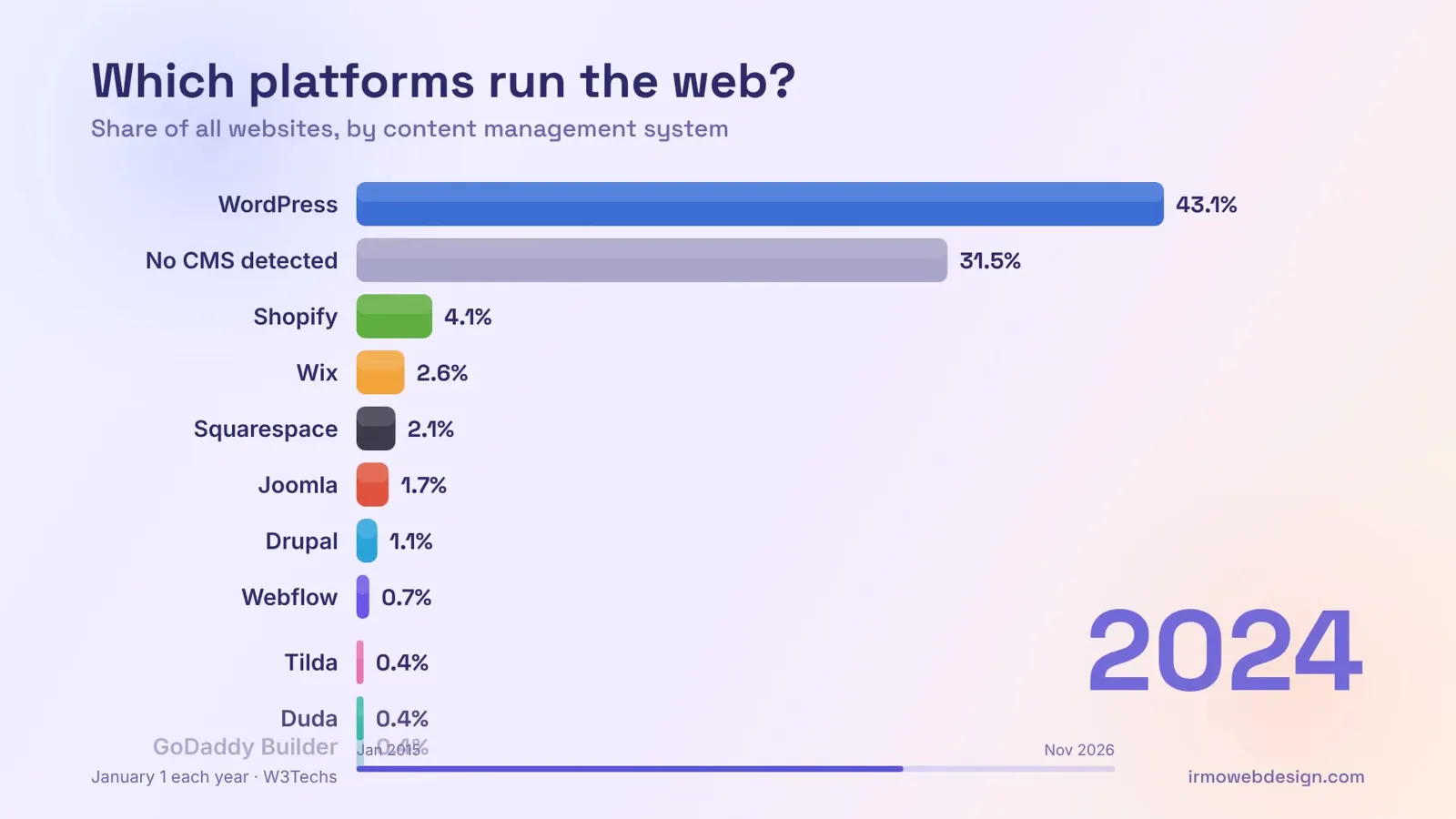
WordPress is far more common than the other two. W3Techs found WordPress on 39.4% of all websites as of November 8, 2026, compared with 4.2% for Wix and 2.4% for Squarespace. Our post on website platform popularity shows how those numbers changed over the last decade.
One note before we start: in this post, "WordPress" means the free, self-hosted software from WordPress.org. WordPress.com is a hosted service built on the same software, and it works more like a builder.
The quick comparison
| WordPress (self-hosted) | Squarespace | Wix | |
|---|---|---|---|
| Who owns the files | You | Squarespace hosts everything | Wix hosts everything |
| Software cost | Free | Included in plan | Included in plan |
| Plans (yearly billing, as of Nov 2026) | Hosting varies widely | $19 to $99/mo | $17 to $159/mo (US) |
| Ease of use | Moderate learning curve | Easiest to keep tidy | Easy, very flexible editor |
| Design freedom | Nearly unlimited | Strong templates, tighter limits | Free placement, many templates |
| Add-ons | Tens of thousands of plugins | Smaller extension set | Large app market |
| SEO control | Most control | Good basics | Good basics plus tools |
| Ecommerce | WooCommerce and others | Built in | Built in |
| Maintenance | You or your provider | Platform handles software | Platform handles software |
| Moving away later | Easy | Partial content export | Design stays on Wix |
Ownership and portability
This is the biggest difference, and most people skip it.
With WordPress, the files and database are yours. You can move to a new host, hire a new developer or back up the whole site whenever you want. If a host raises prices or gives bad service, you leave.
With Squarespace and Wix, you rent the site. You own your content and your domain, but the design, layout and platform features stay with the platform. Squarespace's own help center says its export creates a WordPress-format XML file that includes basic pages, one blog and text and image blocks, but leaves out store pages, most other page types, style settings and custom CSS. Wix is even more direct. Its help center says a site "needs to be hosted and operated on Wix's servers," so you cannot take a Wix site and run it somewhere else.
That is not automatically bad. Renting means someone else keeps the lights on. Just go in knowing that a future move means a rebuild. Our guide to leaving a one-click website builder walks through what that looks like.
Total cost over 3 years
Here is what the plans cost as of November 2026, using the official pricing pages. Prices are per month on yearly billing, before tax.
Squarespace: Basic $19, Core $29, Plus $49, Advanced $99. Monthly billing costs more ($25, $39, $65 and $139). Basic charges a 2% transaction fee on store sales; Core and up charge 0%.
Wix (US pricing): Light $17, Core $29, Business $39, Business Elite $159. Wix notes that prices vary by location. Light does not include ecommerce; Core adds basic ecommerce.
WordPress: The software is free. You pay for hosting, plus any premium theme, paid plugins and maintenance. Good managed hosting often starts around $25 to $35 a month on the plans we reviewed in the best WordPress hosting, while budget shared hosting starts lower but usually renews at a much higher rate.
| Example setup | Monthly (yearly billing) | 3-year platform cost |
|---|---|---|
| Squarespace Basic | $19 | $684 |
| Squarespace Core | $29 | $1,044 |
| Wix Light | $17 | $612 |
| Wix Business | $39 | $1,404 |
| WordPress on $25/mo managed hosting | $25 | $900, plus themes, plugins and upkeep |
What these numbers leave out:
- Domains. Squarespace and Wix both offer a free domain for the first year on yearly plans. After that, you pay renewal.
- Apps and extensions. Wix apps and Squarespace extensions can add monthly fees.
- Plugins and themes. Many WordPress plugins are free, but premium versions often charge a yearly license.
- Maintenance. WordPress needs regular updates. If you pay someone to do it, that is a real monthly cost. See what website maintenance includes and costs.
We cover the add-on fees in more detail in website platform licensing fees.
Ease of use
Squarespace is the easiest to keep looking good. Its templates and section-based editor make it hard to break the design.
Wix is easy too, but in a different way. You can drag almost anything anywhere. That freedom is great for creative owners and risky for anyone who likes to tinker, because pages can drift out of alignment on mobile.
WordPress takes the most learning. The block editor is fine for writing, but setting up a theme, plugins and hosting has a learning curve. Most owners either learn the basics or have a designer build it and then just edit content.
Design flexibility
WordPress has no real ceiling. You can use a theme, a page builder or fully custom code. Squarespace has fewer, more polished templates and less room to do something unusual without custom code. Wix sits in the middle, with free placement and many templates, and Wix Studio for designers who want more control.
SEO capabilities
All three let you edit title tags, meta descriptions and URLs, set up redirects and produce an XML sitemap. Squarespace's AI tools include an SEO Scanner that flags missing SEO copy. Wix has built-in SEO setup tools.
WordPress offers the most control through SEO plugins, custom schema markup and full access to the code. That matters most for large content sites and technical SEO work. For a typical local business, all three are good enough, and your content, reviews and speed will matter more than the platform.
Ecommerce
Squarespace and Wix both have stores built in on their higher plans, which is the simplest path for a small catalog. WordPress uses WooCommerce or another plugin, which gives you more control and fewer platform fees, but more to maintain. If selling is your main business, compare these against Shopify too.
Blogging
WordPress started as blogging software and is still the strongest choice for a content-heavy site, with categories, tags, scheduling, revisions and editorial roles. Squarespace and Wix both handle a regular business blog well. Remember the export limit: Squarespace exports only one blog page, so a site with several blogs is harder to move.
Speed
Squarespace and Wix run on managed infrastructure with a content delivery network, so speed is mostly in their hands. You still control image sizes, embeds and how many apps you add. WordPress speed depends on your host, theme and plugins. A well-built WordPress site on good hosting can be very fast. A bloated one on cheap hosting can be very slow. See how to improve website speed.
Maintenance and security
With Squarespace and Wix, the platform handles software updates, hosting security and SSL. You are still responsible for strong passwords, two-factor login, your content and your forms.
With WordPress, you or your provider handle core, theme and plugin updates, backups and security monitoring. Outdated plugins are a common way WordPress sites get hacked. Managed WordPress hosting takes on part of this work.
Support
Squarespace and Wix each offer their own customer support for anything on their platform. WordPress has no single support desk. You get help from your host, your developer, plugin makers and a very large community.
Scalability
WordPress scales the furthest because you can move to bigger hosting, add custom features and connect almost any system. Squarespace and Wix scale well for typical small and mid-size business sites, but you are limited to what the platform and its apps support.
AI features
All three now include AI tools, and they change often. Here is what each company lists on its own site as of November 2026:
- Squarespace: Blueprint AI builds a multi-page site draft. Other tools include an AI writer for site copy, Image Studio, AI Product Composer, AI blog post help, the SEO Scanner and AI Visibility, which checks whether your brand appears in AI answers.
- Wix: The Wix Harmony editor mixes AI and drag-and-drop editing. Wix names Aria for site building and design, Kleo for marketing and SEO, Juno for customer service and Omni for task automation.
- WordPress: WordPress 7.0 added shared AI infrastructure to core, including the WordPress AI Client and a Connectors screen for setting up AI providers that plugins can use. WordPress.com adds an AI Assistant in the editor on its Business and Commerce plans.
AI can speed up a first draft. It does not replace a clear plan, real photos and your own expertise.
Lock-in and migration
Moving between these platforms always means some rebuilding. Whichever way you go, keep a list of every URL and set up 301 redirects so you keep your search traffic.
Choose WordPress if...
- You want to own your files and be able to switch hosts or developers at any time.
- You plan to publish a lot of content or need custom features later.
- You have someone (you, staff or a provider) to handle updates and security.
Choose Squarespace if...
- You want a clean, professional site with almost no maintenance.
- Your site is mainly service pages, a portfolio, a blog or a small store.
- You care more about looking polished than about unusual features.
Choose Wix if...
- You want to place things exactly where you like without code.
- You expect to add features through apps, like bookings or events.
- You are fine with the site living on Wix for the long run.
Still on the fence? Our guide to how to choose a website platform goes deeper, or talk to us and we will help you pick the platform that fits your business, not the one we happen to like best.
Questions people ask
Is WordPress better than Squarespace or Wix?
Which is cheapest over three years?
Can I move my Wix or Squarespace site to WordPress later?
Which platform is best for SEO?
Do Squarespace and Wix have AI tools?
Planning a website?
Get a platform recommendation and a fixed quote within one business day.